

Core Concepts
Colony stores workflow state separately from the code host and turns eligible work into tasks for Workers. The concepts below are the stable mental model; a deployment’s configuration and selected workflow determine the details.
Organizational boundaries
Section titled “Organizational boundaries”Tenant
Section titled “Tenant”A tenant is Colony’s top-level pipeline and security namespace. Repositories, pipeline records, tasks, credentials, and configuration are associated with a tenant. Use separate tenants when groups require separate administrative or credential boundaries.
A tenant boundary does not, by itself, grant one repository access to another or make every resource interchangeable. Provider credentials, repository registration, Worker eligibility, and deployment configuration still determine what Colony can access and execute.
Repository
Section titled “Repository”A repository is a registered codebase and its code-host identity. Colony reads issues or work items, comments, code, and pull requests through the configured provider, then writes branches, comments, reviews, labels, and pull requests through the same provider.
Self-hosted Colony supports GitHub and Azure DevOps through its provider abstraction. Some capabilities, including automatic external PR review, are provider-specific; follow the setup and reference pages for the deployment you run.
Workflow and pipeline state
Section titled “Workflow and pipeline state”Pipeline
Section titled “Pipeline”A workflow is a versioned state graph. Its states define valid transitions, and state handlers enqueue the executors that perform work. A repository can select a configured workflow, and intake rules can select a workflow for an individual issue. Once ingested, an issue is pinned to a workflow ID and version so later workflow edits do not silently change work already in flight.
The built-in colony-default workflow is the behavior described throughout these Concepts pages. Custom workflows can use different states, transitions, executors, triggers, and hooks.
Pipeline Store
Section titled “Pipeline Store”The Pipeline Store is the authoritative record of an issue’s Colony state and work history. It also records tasks and events such as attempts, costs, and transitions. Code-host labels are a projection of pipeline state; changing or deleting a projected state label does not move the pipeline record.
There are deliberate control surfaces outside that projection. For example, applying colony:enqueue can submit an otherwise untracked issue for intake, and slash commands can request validated workflow actions. Those controls are handled explicitly; arbitrary label edits are not state transitions.
States
Section titled “States”An issue has one current workflow state. In the built-in workflow, the common path is:
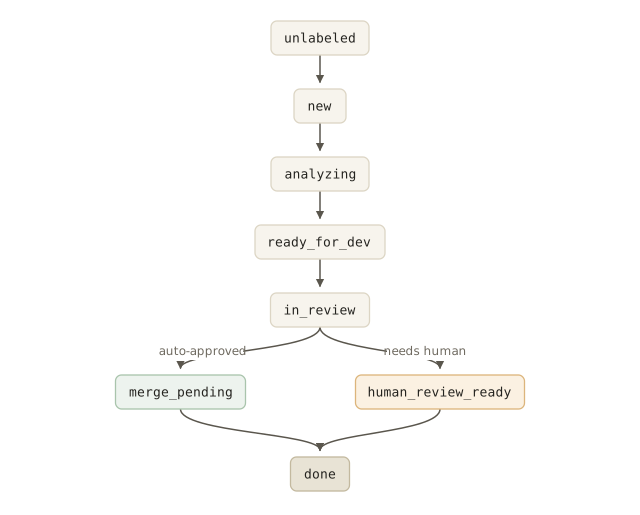
The built-in workflow contains 15 states, including unlabeled, paused, clarification, planning, dependency and failure blocks, review loops, merge handling, subtask waiting, and done. The diagram shows the common path, not every transition. See Pipeline States for the complete built-in graph.
Labels and tags
Section titled “Labels and tags”State labels use hyphenated names such as colony:ready-for-dev and colony:in-review.
Issues
Section titled “Issues”An issue—or an Azure DevOps work item—is the normal unit of work in the built-in development pipeline. The analyzer interprets its title, body, conversation, repository context, and conventions. Clear desired outcomes and constraints improve the result, but Colony does not require a fixed issue template.
Not every task starts as a human-filed issue. Self-improvement can seed an issue from a scheduled track, external PR review creates a review task for an existing GitHub PR, and workflow hooks can enqueue maintenance work such as retrospection.
See Writing for Colony for practical issue-writing guidance.
The Mayor and Workers
Section titled “The Mayor and Workers”The Mayor is the coordinating service. It ingests work, resolves workflow snapshots, enqueues tasks, evaluates dependencies, reacts to events, and runs reconciliation and recovery routines.
A Worker is a task-execution process. An eligible Worker claims one queued task at a time and invokes the task’s executor. A standard Worker registers the built-in analysis, planning, development, review, merge, sweep, CI-repair, external-review, retrospective, and code-map executors. Repository scope, task requirements, deployment configuration, and installed plugins determine which Worker can claim a given task.
Read Agents for the division of responsibility and The Workflow for the built-in issue lifecycle.
The Humans
Section titled “The Humans”Colony does not enforce the four human roles described in this portal as product identities. They are an activity-based way to assign ownership: