

The Workflow
This page describes the built-in colony-default workflow. It is the default, not a universal state machine: a repository or issue can use another versioned workflow with different states, executors, and transitions.
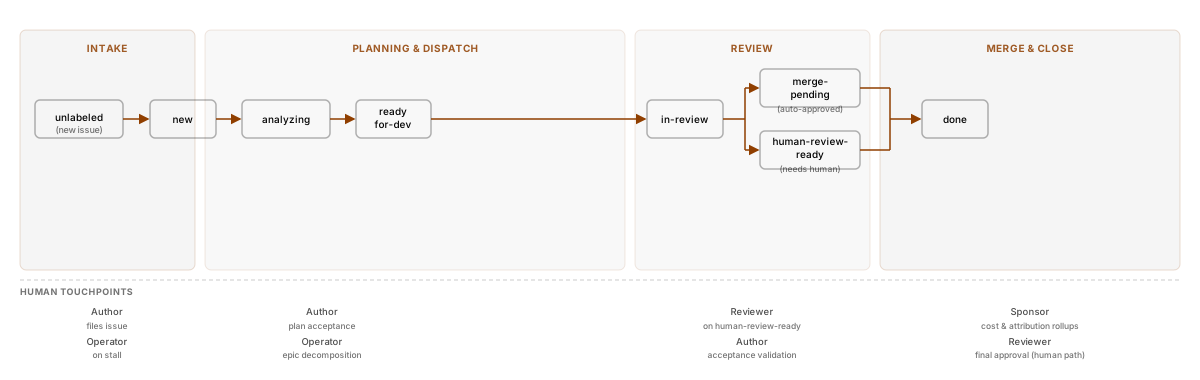
Phase 1: Intake
Section titled “Phase 1: Intake”An eligible issue enters the Pipeline Store and is pinned to a workflow ID and version. Depending on intake configuration, eligibility can come from normal ingestion, the colony:enqueue label, or an enqueue command. The Mayor transitions new work to analyzing, which queues an Analyze task.
The analyzer reads the issue, its conversation, repository context, and .colony/conventions.md when that file exists. It then takes one of several paths:
- ordinary, actionable work moves to
ready-for-dev - ambiguous work moves to
needs-clarificationwith a question on the issue - epic-scale work moves to
planning - work the analyzer can safely decompose directly may create child issues
When the analyzer asks a question, reply in an issue comment. A qualifying human reply resumes the stage that requested clarification. Editing the issue body is useful for keeping the specification current, but an edit alone is not the clarification-reply trigger.
The analyzer’s plan is context for execution, not a human approval gate. If it is materially wrong before implementation begins, update the issue and use /colony:reanalyze where the active workflow permits it. A normal comment on work already in ready-for-dev does not automatically run analysis again.
Phase 2: Planning & Dispatch
Section titled “Phase 2: Planning & Dispatch”The Plan executor decomposes epic-scale work into child issues. The parent waits in waiting-for-subtasks, and Sweep tasks periodically check whether its children have completed before the parent continues.
Before runnable work proceeds, the Mayor evaluates dependencies represented in Colony’s records. Work that cannot safely proceed can move to dependency-blocked; it becomes eligible again when the blocking condition clears. A dependency block is not a general-purpose human “lock” that can be removed by changing a code-host label.
Planning is conditional. Most small and medium issues go from analysis directly to development.
Phase 3: Development
Section titled “Phase 3: Development”Entering ready-for-dev queues a Develop task. An eligible Worker claims it, prepares a workspace and branch, implements the requested change, performs the developer executor’s self-validation, and creates or updates a pull request.
If automated review requests changes, the issue enters changes-requested; that state queues another Develop task with the review feedback as context. Retries, cost limits, command failures, conflicts, and infrastructure failures can instead place work on a recovery or attention path.
Colony records attempts and transitions as they happen. The Mayor also performs reconciliation and recovery, but not every failure is automatically repairable. Operators can inspect the current state and task error, then use an allowed slash command such as /colony:retry, /colony:pause, or /colony:cancel as appropriate.
Phase 4: Review
Section titled “Phase 4: Review”After a pull request is ready, in-review queues a Review task. The reviewer can run the deterministic commands configured under review.checks; Colony does not invent lint, test, type-check, or security commands that the repository has not configured. It also performs an LLM review using the issue, diff, repository context, and conventions.
The main outcomes are:
- approval moves the issue toward
merge-pending - actionable findings move it to
changes-requested, creating a develop-review loop - failures or conditions that require human action move it to an appropriate attention state such as
human-review-readyorfailure-blocked
The maximum number of automated review cycles is configurable. There is no built-in rule that a particular number of cycles is “normal”; repeated loops should be diagnosed from the recorded findings and task errors.
Human reviewers can inspect the PR at any time. When explicit pipeline steering is needed, use the slash command designed for that action—for example, /colony:feedback, /colony:review, or /colony:reimplement when valid in the current workflow—instead of assuming an ordinary PR comment changes pipeline state.
Phase 5: Merge & Close
Section titled “Phase 5: Merge & Close”Approval does not always mean Colony will merge. The repository’s review.auto_merge_on_approval setting controls whether the built-in merge path attempts an automatic merge. When it is disabled, approved work is surfaced at human-review-ready for a human-controlled merge.
When automatic merge is enabled, Colony still depends on the code host to permit the merge. Required checks, branch protection, unresolved conflicts, and provider permissions can delay or prevent it. Colony has no built-in freeze-window or per-PR do-not-automerge feature; use code-host protection and deployment merge policy for those controls.
After a successful merge, Colony transitions the issue to done, projects completion back to the code host, and runs the built-in Retrospect terminal hook. Pipeline, cost, and audit events were recorded throughout the lifecycle rather than created only at merge time.
Other built-in paths
Section titled “Other built-in paths”The built-in graph also includes:
paused, which stops that issue until resumedfailure-blocked, for failures that need recovery or intervention- CI-repair tasks triggered by qualifying hard CI failures
unlabeled, for tracked issues not yet admitted to active work- reopen, manual state, and other command-driven transitions when declared by the active workflow
See Pipeline States and Slash Commands for the exact built-in graph and command constraints.